Where Antrea Ends and NSX Begins: Traffic In and Out of VKS
A colleague asked me how egress works for a VKS cluster in an NSX VPC. I went to the documentation to answer and couldn’t find a good answer.
The documentation describes each piece on its own: Broadcom’s pages cover NSX VPCs, the Transit Gateway and a LoadBalancer Service getting an address, and Antrea’s own documentation covers VKS’s default CNI. What none of it does is follow a packet through those pieces, say where the cluster stops and NSX takes over, or say whether NCP, the NSX Container Plugin that has long connected the Supervisor to NSX, still has a part to play. The page for the NSX Operator, the newer half of that story, says very little.
So I followed packets through my own lab, one in, one out and one across, and recorded what each component did to them. This is the map I wanted, with the commands to check every hop yourself.
The lab runs VCF 9.1.1 with VKS 3.7. The cluster, planespotter-01, has one control plane and two workers on Kubernetes 1.36, in a vSphere Namespace with NSX VPC networking. The workload is Planespotter, a small Python app whose web frontend sits behind a LoadBalancer Service. Yves Fauser originally built it years ago as an NSX demo, and I brought it back to life last year, so it’s fitting that it’s helping to explain NSX again.
The Map
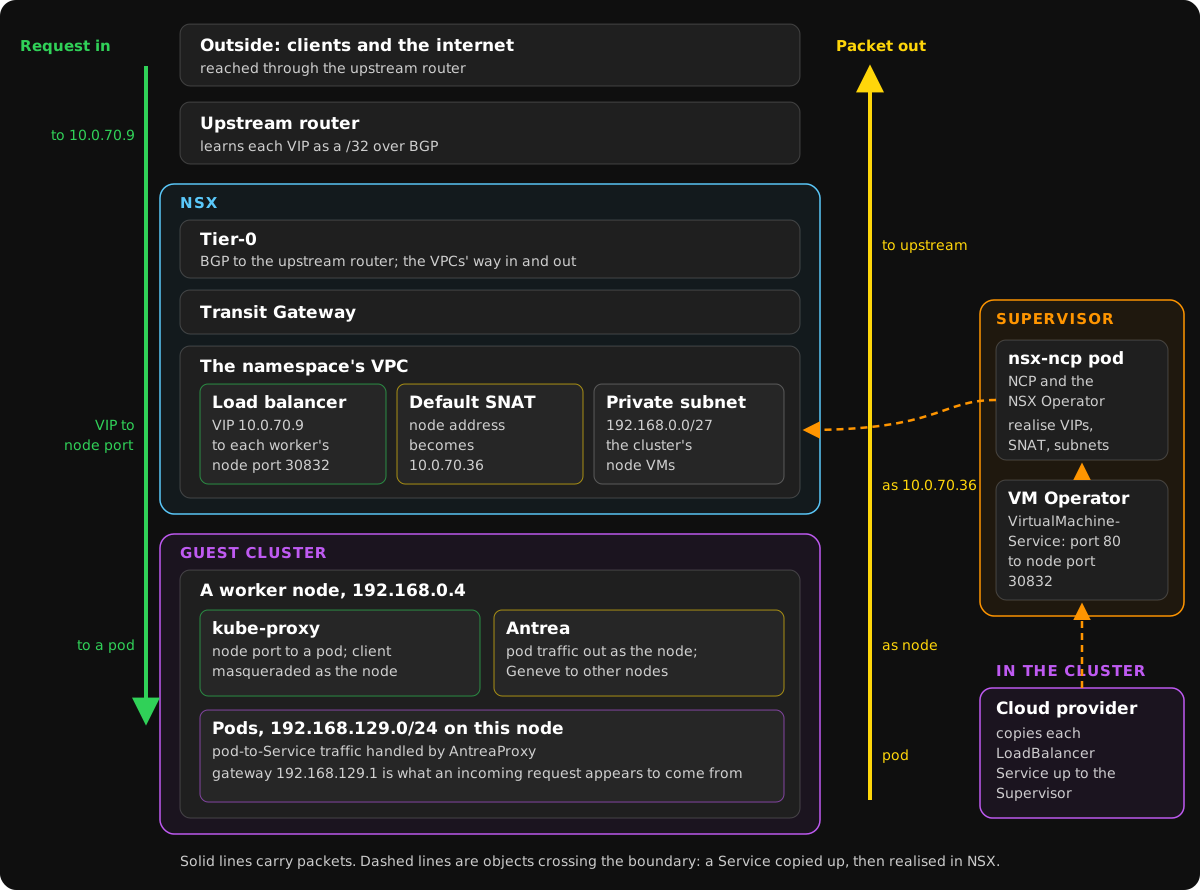
There are three places, and most confusion lives at the boundaries between them:
| Where | Component | What it does to traffic |
|---|---|---|
| The guest cluster | Antrea, an agent on every node | Gives each pod its address, tunnels pod traffic between nodes, enforces NetworkPolicy, sends pod-to-Service traffic to an endpoint, and masquerades pod traffic leaving the cluster as the node’s address |
| kube-proxy | Handles traffic arriving at node ports, which is how a load balancer reaches the cluster | |
| The guest cluster cloud provider | Turns a LoadBalancer Service into an object on the Supervisor | |
| The Supervisor | VM Operator | Holds that object, a VirtualMachineService |
| NCP and the NSX Operator | Realise the namespace’s network in NSX: its VPC, subnets, load balancer and SNAT | |
| NSX | The namespace’s VPC | A private subnet for the cluster’s node VMs, a load balancer, and default outbound NAT |
| The Transit Gateway and the Tier-0 | Route between the VPC and everything outside it |
Is NCP still involved? Yes, but only on the Supervisor, and no longer alone. In VCF 9.1, NCP and the NSX Operator run as two containers of one deployment, nsx-ncp in the Supervisor’s vmware-system-nsx namespace:
$ kubectl -n vmware-system-nsx get deployments -o wide        # on the Supervisor
NAME      READY   UP-TO-DATE   AVAILABLE   AGE     CONTAINERS             IMAGES
nsx-ncp   2/2     2            2           2d16h   nsx-ncp,nsx-operator   localhost:5000/vmware/nsx-ncp-photon:9.1.0.25686318,localhost:5000/vmware/nsx-operator:9.1.0.25686318
The NSX Operator is the one you meet as a namespace user. Its resources, in the crd.nsx.vmware.com group, are how the Supervisor describes a namespace’s network: NetworkInfo, SubnetSet, SubnetPort, IPAddressAllocation, SecurityPolicy and more. NCP keeps its own nsx.vmware.com resources alongside. Nothing NSX-related runs inside the guest cluster at all: there, it’s Antrea, kube-proxy and the cloud provider.
A Request In
What a developer sees. The frontend is a LoadBalancer Service with an external address, and Kubernetes has given it a node port for each port:
$ kubectl -n planespotter-buildpacks get service frontend
NAME       TYPE           CLUSTER-IP       EXTERNAL-IP   PORT(S)                       AGE
frontend   LoadBalancer   10.112.138.203   10.0.70.9     80:30832/TCP,8080:30570/TCP   16h
One layer down. The address didn’t come from anything inside the cluster. The guest cluster cloud provider saw the Service and created a VirtualMachineService in the vSphere Namespace on the Supervisor, labelled with the Service it stands for. Its ports are the Service’s ports, but its targets are the node ports on every worker VM:
apiVersion: vmoperator.vmware.com/v1alpha5
kind: VirtualMachineService
metadata:
  name: planespotter-01-790ef9fdec18567bbdd5b
  namespace: planespotter-dev
  labels:
    run.tanzu.vmware.com/cluster.name: planespotter-01
    run.tanzu.vmware.com/service.name: frontend
    run.tanzu.vmware.com/service.namespace: planespotter-buildpacks
spec:
  type: LoadBalancer
  ports:
  - {name: http, port: 80, protocol: TCP, targetPort: 30832}
  - {name: app, port: 8080, protocol: TCP, targetPort: 30570}
  selector:
    capv.vmware.com/cluster.name: planespotter-01
    capv.vmware.com/cluster.role: node
status:
  loadBalancer:
    ingress:
    - ip: 10.0.70.9
NCP and the NSX Operator realise that object as a virtual server on the VPC’s load balancer, NSX’s own in this lab, with an address from the external IP block the VPC is allowed to use. The cluster’s API address works the same way: there’s a VirtualMachineService called planespotter-01 for port 6443 on the control plane, at 10.0.70.7.
So a request to http://10.0.70.9 takes this path:
- To NSX. The Tier-0 advertises every address in use from the external block as its own /32 route over BGP, so the upstream router knows to send
10.0.70.9to it. - Across NSX. The Tier-0 hands it to the Transit Gateway, which hands it to the VPC’s load balancer.
- To a node. The load balancer picks a worker VM and sends the request to its node port,
30832. - To a pod. On the node, kube-proxy translates the node port to a frontend pod and, because the Service has
externalTrafficPolicy: Cluster, masquerades the source as the node. - Into the pod. Antrea delivers it, or tunnels it to the other worker if the chosen pod lives there.
Antrea’s Traceflow can record a real packet as it arrives. I sent requests to 10.0.70.9 from my laptop, through the lab’s gateway, until one landed on the traced pod:
captured: 192.168.129.1 -> 192.168.129.49
planespotter-01-node-pool-1-fzgth-57lb9-sbs66
  Forwarding: Received
  Forwarding/Output: Delivered
The pod saw the request come from 192.168.129.1, the node’s own Antrea gateway address, not from the gateway it entered the lab through. With the default externalTrafficPolicy: Cluster, the client’s address is gone by the time the request reaches your app.
A Packet Out
What a developer sees. A pod reaches the internet with no proxy and no configuration. From a throwaway pod, the address the outside world sees is the corporate network’s public one, four address translations away from the pod’s own 192.168.129.50.
One layer down. Traceflow follows the packet as far as Antrea can see it: out of the pod and out of the cluster’s network.
planespotter-01-node-pool-1-fzgth-57lb9-sbs66
  SpoofGuard: Forwarded
  Forwarding/Output: ForwardedOutOfNetwork
After that, the hops are:
-
The node. Antrea masquerades pod traffic leaving the cluster as the node’s address. Each node carries a rule for its own pod range:
-A ANTREA-POSTROUTING -s 192.168.130.0/24 ! -o antrea-gw0 -m comment --comment "Antrea: masquerade Pod to external packets" -m set ! --match-set ANTREA-POD-IP dst -j MASQUERADE -
The VPC. The worker leaves on its private VPC subnet,
192.168.0.0/27, and the VPC’s default outbound NAT translates it to the namespace’s SNAT address. The Supervisor’sNetworkInfoshows both, along with the load balancer’s address on the Transit Gateway’s internal range:vpcs: - name: planespotter-dev_8vqqo networkStack: FullStackVPC defaultSNATIP: 10.0.70.36 loadBalancerIPAddresses: 100.64.0.9 privateIPs: - 192.168.0.0/17 -
The Transit Gateway and the Tier-0. The Transit Gateway passes it to the Tier-0, which sends it to its upstream router.
-
Beyond. In my lab, a gateway VM and then the corporate network each translate it once more.
Two more details matter on the way out. The pod’s interface MTU is 1450, leaving room for Antrea’s Geneve header. And names resolve through CoreDNS at 10.112.0.10, which forwards anything outside cluster.local to whatever resolver the node VM was given.
Across the Cluster
Traffic between pods never leaves Antrea’s care, and Services work differently depending on where the traffic starts. Antrea’s configuration in VKS shows the split:
trafficEncapMode: encap
tunnelType: geneve
noSNAT: false
antreaProxy:
  enable: true
  proxyAll: false
From a pod, AntreaProxy handles the Service in Antrea’s own pipeline. Here a frontend pod calls the api-server Service: AntreaProxy picks an api-server pod, translates the address, and tunnels the packet over Geneve to the worker where that pod runs:
planespotter-01-node-pool-1-fzgth-57lb9-sbs66
  SpoofGuard: Forwarded
  LB: Forwarded pod=planespotter-buildpacks/api-server-dd4457dd7-sc6zn dnat=192.168.130.40
  Forwarding/Output: Forwarded tunnel-to=192.168.0.3
planespotter-01-node-pool-1-fzgth-57lb9-g2t5f
  Forwarding: Received
  Forwarding/Output: Delivered
From outside, with proxyAll off, kube-proxy still runs on every node and handles traffic arriving at node ports. That’s why the load balancer’s path above goes through kube-proxy rather than Antrea.
The addresses stay private because they only have to be unique inside one VPC. Each node gets a /24 of the pod range, 192.168.128.0/18. The nodes sit on 192.168.0.2 to .4, and the Supervisor’s own NCP pods report 192.168.0.2 and 192.168.0.4 as well: the same addresses, each in its own VPC.
What the Cluster Gives You
- Ingress is a standard package, not a default. A new cluster has the Gateway API’s resource types installed, but no
GatewayClassand noIngressClassto implement them, so out of the box a LoadBalancer Service is the way in. The standard choice is Contour, one of VKS’s standard packages. It runs Envoy on every node, typically behind a LoadBalancer Service of its own, so ingress traffic follows the request-in path above as far as Envoy, which then routes it by host and path to your Services. - Antrea’s features are switched on. The agent, version 2.6, runs with Antrea-native policy, Egress, ServiceExternalIP, NodePortLocal and Traceflow enabled. This post uses only Traceflow, but the others are there to build on.
- NetworkPolicy is Antrea’s. Kubernetes NetworkPolicy inside the cluster is enforced by Antrea. Flux’s own installation, for example, brings three policies into
flux-system. NSX’s firewall is a separate layer outside the cluster: the Supervisor serves the NSX Operator’sSecurityPolicyresource for that, and this lab uses none.
Checking It Yourself
Every hop above comes from commands you can run with an ordinary login.
In the guest cluster:
kubectl get services -A
kubectl -n kube-system get configmap antrea-config -o yaml
kubectl -n kube-system exec ds/antrea-agent -c antrea-agent -- antctl get featuregates
On the Supervisor, in your vSphere Namespace:
kubectl -n <namespace> get virtualmachineservices
kubectl -n <namespace> get networkinfos,subnetsets,subnetports
kubectl -n vmware-system-nsx get deploymentsTraceflow, for when something doesn’t arrive. This one injects a TCP SYN at a frontend pod, addressed to the api-server Service, and follows it:
apiVersion: crd.antrea.io/v1beta1
kind: Traceflow
metadata:
  name: tf-east-west
spec:
  source: {namespace: planespotter-buildpacks, pod: frontend-8449857594-7xkzl}
  destination: {namespace: planespotter-buildpacks, service: api-server}
  packet:
    ipHeader: {protocol: 6}
    transportHeader: {tcp: {srcPort: 40000, dstPort: 8000, flags: 2}}
  timeout: 30
kubectl get traceflow tf-east-west -o yaml then shows each stage the packet passed and what Antrea did to it. Set liveTraffic: true with only a destination pod, as I did for the request in, and it records the first real packet that arrives instead. Antrea’s Traceflow guide, for the version the cluster runs, has the rest.
Things That Catch People Out
- A pod range inside the VPC’s private range. The Supervisor refuses it when you create the cluster:
spec.clusterNetwork.pods.cidrBlocks (192.168.0.0/16) intersects with NSX-VPC reserved range (192.168.0.0/17). Pick a pod range clear of the namespace’s private range; mine is192.168.128.0/18. - An address that resolves but never routes. For a load balancer address to leave NSX, three settings have to line up: the External Connection must permit the external blocks to be advertised, the Transit Gateway’s attachment must advertise
PUBLICaddresses, and the Tier-0 must redistribute Transit Gateway routes into BGP. Miss any one and every object still reports success. An attachment created through the Policy API without an explicit rule advertises nothing, whatever the documented default says. - The Supervisor shares your external block. It takes addresses for its own services, such as its registry, DNS and API, from the low end of the same block your Services draw on, and takes more as you enable features. Size the block for the platform’s addresses as well as yours.
The Short Version
Inside the guest cluster, it’s Antrea and kube-proxy: Antrea for pods, pod-to-Service traffic, policy and the masquerade on the way out, kube-proxy for node ports on the way in. Outside, it’s NSX: the VPC’s load balancer and SNAT, the Transit Gateway and the Tier-0. The guest cluster cloud provider and the Supervisor’s VirtualMachineService are the bridge, with NCP and the NSX Operator turning one side’s requests into the other’s objects.
When something doesn’t arrive, Traceflow tells you which side of that line it stopped on.